Learn how to create, edit, and manage context documents using TextQL’s product-native context editor
Overview
TextQL’s context editor is your central hub for creating and managing all context documents. It provides a user-friendly interface for writing context, uploading files, and organizing your organization’s knowledge base.
Access the Context Editor: Navigate to the Context page from the left sidebar in your TextQL workspace.
The Context Library
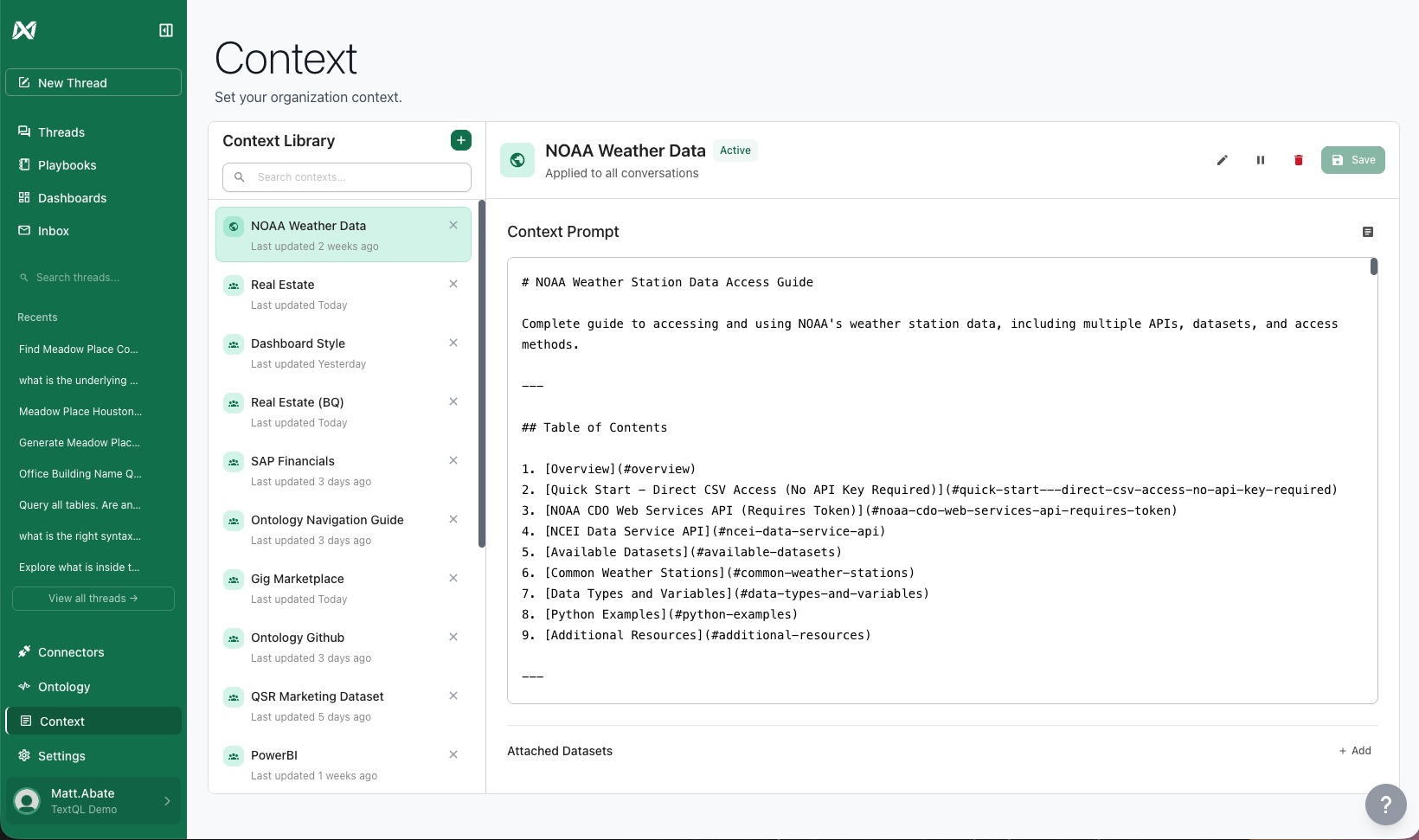
The Context Library is where all your context documents live. It provides a searchable, organized view of all context across your organization.
The Context Library showing multiple context documents
Creating a New Context Document
1
Click Add Context
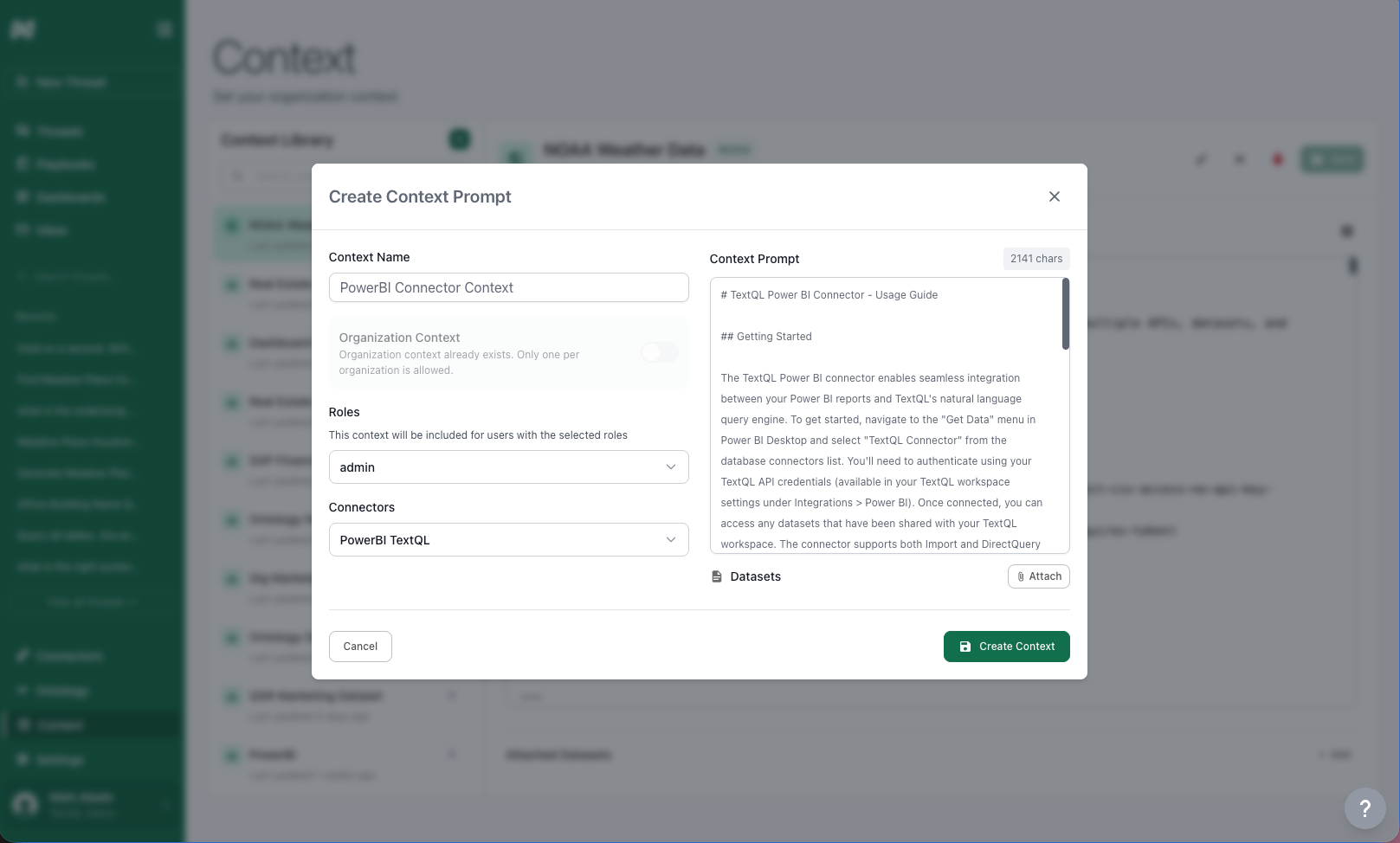
Click the + (plus) button in the Context Library to open the create context dialog.
Create context dialog
2
Give It a Name
Give your context document a descriptive name that clearly indicates its purpose, like “LinkedIn Analytics Warehouse” or “Sales Team Best Practices”.
3
Set the Scope
Choose where this context should apply:Organization Context
Applies to everyone in your organization
Only one organization context document is allowed
If one already exists, this option will be disabled
Roles
Select one or more roles that should see this context
Users must have the selected role to access this context
Connectors
Select one or more data connectors
Context applies when users are actively chatting with the selected connector
Role + Connector Combination
Select both roles AND connectors
Context applies only when a user with the specified role queries the specified connector
This is the most targeted form of context scoping
Scoping Strategy: Start broad (organization-level) and add specific context as needed. Learn more in Context Scoping.
4
Write Your Context
Enter your context content in the plain text editor. No special formatting or structure is required — just write naturally. You can also ask Ana to write context for you (see Best Practices below).
5
Attach Datasets (Optional)
Click the + Attach button under “Datasets” to link relevant data files to this context.Attached datasets help Ana understand the structure and content of your data when this context is active.
6
Save Your Context
Click Create Context to save your new context document. It becomes immediately available to users based on your scoping settings.
Uploading Files
The context editor supports uploading any file type. Here are some common examples:
Documents
PDFs, Microsoft Word, markdown, or any text-based documentation.
Slide Decks
PowerPoint presentations, Keynote files, or slide decks saved as PDF.
Data Files
CSVs, Excel spreadsheets, Parquet files, Oracle Primavera P6 exports, and more.
Anything Else
Any other file type your team works with — just upload it.
How to Upload Files
Click the Upload or Attach button in the context editor
Select your file from your computer
Wait for the upload to complete
The file content is automatically processed and incorporated into the context
Editing Existing Context
To edit a context document:
Find the document in the Context Library
Click the Edit icon (pencil) next to the document name
Make your changes in the editor
Click Save to update the context
Remember to Save: After making changes, click Save to apply them. Saved changes apply to all new chats immediately. Existing chats may need to be refreshed.
Ana-Proposed Context Edits
Ana can read and propose changes to your shared context library directly from a chat. Instead of applying edits immediately, Ana uses a review-before-apply workflow so you stay in control of what gets saved.
How it works
1
Ana makes edits in the sandbox
When you ask Ana to update or create a context document, she reads and writes files in a sandboxed copy of your library. Nothing is changed in the shared library yet.
2
Ana generates a diff for review
Ana calls generate_patch to produce a unified diff of all her edits and displays it in the chat as a fenced code block. You can read exactly what will change before anything is applied.
3
You confirm or discard
The system renders a confirmation prompt — Apply these changes? or Discard? — directly in the chat. You do not need to copy anything or navigate away.
Apply: the patch is uploaded and applied to the shared library immediately.
Discard: the proposed changes are thrown away and the library is unchanged.
Review the diff carefully. Context that is wrong is often worse than no context at all — Ana will confidently apply an incorrect rule to every future conversation. Take a moment to read the proposed changes before confirming.
Triggering a context edit
You can ask Ana to update the context library in natural language:
“Add a note to the context library that we always exclude test accounts from revenue calculations.”
“Update the Sales Team context to reflect the new quota structure.”
“Create a new context document for the Finance team with our fiscal calendar.”
Ana will make the edits, show you the diff, and wait for your confirmation before anything is saved.
Managing Context Documents
Click on any context document in the library to view its full content, scope, attached datasets, and status. From there you can edit, pause, or delete the document. Pausing a context document temporarily disables it without deleting it — useful for testing or temporarily removing context without losing your work.
Best Practices
Get Ana to Write Your Context
The most effective way to create context is to have Ana write it for you. After a successful chat where Ana performed an action the way you wanted, ask her to turn those instructions into a context document. We’ve found that Ana follows instructions best when she wrote them herself based on a real, successful interaction.Ana will show you a diff of the proposed changes and ask for your confirmation before saving anything to the shared library.
Keep Context Focused
Each context document should have a clear, single purpose. Don’t try to cram everything into one document.Good: “Sales Team Terminology”
Bad: “Everything About Our Company”
Use Descriptive Names
Name context documents so anyone in your organization can understand their purpose at a glance.
Update Regularly
Context should evolve with your organization. Review and update context documents quarterly or when business processes change.
Test Your Context
After creating context, test it by chatting with Ana to ensure she’s interpreting it correctly.
What’s Next?
Context Scoping
Learn how to apply context at different levels and understand scoping rules
GitHub Integration
Manage context documents through version-controlled GitHub repositories
{"docsConfig":{"theme":"mint","$schema":"https://mintlify.com/docs.json","name":"TextQL Docs","colors":{"primary":"#0D9373","light":"#07C983","dark":"#0D9373"},"logo":{"light":"https://mintcdn.com/textql/9RDmZW4lVU96oHnJ/logo-textql/light.svg?fit=max\u0026auto=format\u0026n=9RDmZW4lVU96oHnJ\u0026q=85\u0026s=069d276e4ee2f256e061f8e2db9860a3","dark":"https://mintcdn.com/textql/9RDmZW4lVU96oHnJ/logo-textql/dark.svg?fit=max\u0026auto=format\u0026n=9RDmZW4lVU96oHnJ\u0026q=85\u0026s=1a728bc3acfd6eda203c49a45eac0355"},"favicon":"https://mintcdn.com/textql/jK3bTwZd_T-GaQ4j/favicon.svg?fit=max\u0026auto=format\u0026n=jK3bTwZd_T-GaQ4j\u0026q=85\u0026s=4f7feffa45a51a795a1b929f05a772bf","api":{"openapi":["api-reference/platform/chat.openapi.yaml","api-reference/platform/playbooks.openapi.yaml","api-reference/platform/agents.openapi.yaml","api-reference/platform/connectors.openapi.yaml","api-reference/platform/api_access_key.openapi.yaml","api-reference/platform/sandbox.openapi.yaml","api-reference/platform/v2.openapi.yaml","api-reference/speakeasy/textql-api-with-code-samples.yaml"],"mdx":{"auth":{"method":"bearer"},"server":"https://app.textql.com"}},"appearance":{"default":"light","strict":false},"navbar":{"links":[{"href":"mailto:support@textql.com","label":"Support"}],"primary":{"type":"button","label":"Dashboard","href":"https://app.textql.com"}},"footer":{"socials":{"x":"https://x.com/TextQL","github":"https://github.com/textqllabs","linkedin":"https://www.linkedin.com/company/textql"}},"styling":{"latex":true},"navigation":{"pages":[]}},"deployment":{"deploymentMetadataValue":{"subdomain":"textql","hasAudioNarration":false,"actualSubdomain":"textql","customDomains":["docs.textql.com"],"gitSource":{"type":"github","owner":"textqllabs","repo":"demo2","deployBranch":"main","contentDirectory":"docs/public","isPrivate":true,"mountPath":"","label":""},"entitlements":{},"buildId":"6af603b7aecf0202e5cba9fa","clientVersion":"0.0.4128","searchFilterCounts":[{"language":"default","tag":"v3 API (SDK)","count":454},{"language":"default","tag":"Workshops","count":202},{"language":"default","tag":"Documentation","count":164},{"language":"default","tag":"Ontology Management Service","count":70},{"language":"default","tag":"v2 API","count":56},{"language":"default","tag":"Set Up Your Data","count":56},{"language":"default","tag":"RBAC Service","count":41},{"language":"default","tag":"Chat Service","count":39},{"language":"default","tag":"Playbook Service","count":39},{"language":"default","tag":"How It Works","count":32}]},"assistantConfig":{},"basePath":"","hasChatPermissions":false,"hasWebMcpPermissions":false,"toggles":[{"name":"kill-isr","enabled":true,"variant":{"name":"disabled","enabled":false,"feature_enabled":true},"impressionData":false},{"name":"custom-rbac-roles","enabled":true,"variant":{"name":"disabled","enabled":false,"feature_enabled":true},"impressionData":false},{"name":"agent-mintlify-slack","enabled":true,"variant":{"name":"disabled","enabled":false,"feature_enabled":true},"impressionData":false},{"name":"agent-integrations-settings","enabled":true,"variant":{"name":"disabled","enabled":false,"feature_enabled":true},"impressionData":false},{"name":"rbac-expansion","enabled":true,"variant":{"name":"disabled","enabled":false,"feature_enabled":true},"impressionData":false},{"name":"automations-pr-grouping","enabled":true,"variant":{"name":"disabled","enabled":false,"feature_enabled":true},"impressionData":false},{"name":"custom-prefix","enabled":true,"variant":{"name":"disabled","enabled":false,"feature_enabled":true},"impressionData":false},{"name":"analytics-v7","enabled":true,"variant":{"name":"disabled","enabled":false,"feature_enabled":true},"impressionData":false},{"name":"user-flows-analytics","enabled":true,"variant":{"name":"disabled","enabled":false,"feature_enabled":true},"impressionData":false},{"name":"no-publish-flow","enabled":true,"variant":{"name":"disabled","enabled":false,"feature_enabled":true},"impressionData":false},{"name":"workos-onboarding","enabled":true,"variant":{"name":"disabled","enabled":false,"feature_enabled":true},"impressionData":false},{"name":"snapshot-serving-live","enabled":true,"variant":{"name":"disabled","enabled":false,"feature_enabled":true},"impressionData":false},{"name":"stripTemperatureMiddleware","enabled":true,"variant":{"name":"disabled","enabled":false,"feature_enabled":true},"impressionData":false},{"name":"support-platform-pylon-zendesk","enabled":true,"variant":{"name":"disabled","enabled":false,"feature_enabled":true},"impressionData":false},{"name":"snapshot-serving","enabled":true,"variant":{"name":"disabled","enabled":false,"feature_enabled":true},"impressionData":false},{"name":"instant-rollback","enabled":true,"variant":{"name":"disabled","enabled":false,"feature_enabled":true},"impressionData":false},{"name":"granular-notifications-server","enabled":true,"variant":{"name":"disabled","enabled":false,"feature_enabled":true},"impressionData":false},{"name":"granular-notifications","enabled":true,"variant":{"name":"disabled","enabled":false,"feature_enabled":true},"impressionData":false},{"name":"automations-fable","enabled":true,"variant":{"name":"disabled","enabled":false,"feature_enabled":true},"impressionData":false},{"name":"fixed-ai-action-pricing","enabled":true,"variant":{"name":"disabled","enabled":false,"feature_enabled":true},"impressionData":false},{"name":"automation-resolve-merge-conflict","enabled":true,"variant":{"name":"disabled","enabled":false,"feature_enabled":true},"impressionData":false},{"name":"scoped-publishing","enabled":true,"variant":{"name":"disabled","enabled":false,"feature_enabled":true},"impressionData":false},{"name":"mintql","enabled":true,"variant":{"name":"disabled","enabled":false,"feature_enabled":true},"impressionData":false},{"name":"page-level-analytics","enabled":true,"variant":{"name":"disabled","enabled":false,"feature_enabled":true},"impressionData":false},{"name":"editor-version-history-v2","enabled":true,"variant":{"name":"disabled","enabled":false,"feature_enabled":true},"impressionData":false},{"name":"billing-page-v2","enabled":true,"variant":{"name":"disabled","enabled":false,"feature_enabled":true},"impressionData":false},{"name":"full-page-search","enabled":true,"variant":{"name":"disabled","enabled":false,"feature_enabled":true},"impressionData":false},{"name":"workspace-projects","enabled":true,"variant":{"name":"disabled","enabled":false,"feature_enabled":true},"impressionData":false},{"name":"assistant-v5","enabled":true,"variant":{"name":"disabled","enabled":false,"feature_enabled":true},"impressionData":false},{"name":"fork-pr-previews","enabled":true,"variant":{"name":"disabled","enabled":false,"feature_enabled":true},"impressionData":false},{"name":"revalidation-jwt","enabled":true,"variant":{"name":"disabled","enabled":false,"feature_enabled":true},"impressionData":false},{"name":"workos-sso-scim","enabled":true,"variant":{"name":"disabled","enabled":false,"feature_enabled":true},"impressionData":false},{"name":"hobby-abuse-scan","enabled":true,"variant":{"name":"disabled","enabled":false,"feature_enabled":true},"impressionData":false},{"name":"dashboard-inbox","enabled":true,"variant":{"name":"disabled","enabled":false,"feature_enabled":true},"impressionData":false},{"name":"workos-signup","enabled":true,"variant":{"name":"disabled","enabled":false,"feature_enabled":true},"impressionData":false},{"name":"turbopuffer-dual-write","enabled":true,"variant":{"name":"disabled","enabled":false,"feature_enabled":true},"impressionData":false},{"name":"workos-enabled","enabled":true,"variant":{"name":"disabled","enabled":false,"feature_enabled":true},"impressionData":false},{"name":"approve-review-flow","enabled":true,"variant":{"name":"disabled","enabled":false,"feature_enabled":true},"impressionData":false},{"name":"editor-metadata","enabled":true,"variant":{"name":"disabled","enabled":false,"feature_enabled":true},"impressionData":false},{"name":"sso-setup-deadline-banner","enabled":true,"variant":{"name":"disabled","enabled":false,"feature_enabled":true},"impressionData":false},{"name":"turbopuffer-serve","enabled":true,"variant":{"name":"disabled","enabled":false,"feature_enabled":true},"impressionData":false},{"name":"live-agents","enabled":true,"variant":{"name":"disabled","enabled":false,"feature_enabled":true},"impressionData":false},{"name":"llms-txt-v2","enabled":true,"variant":{"name":"disabled","enabled":false,"feature_enabled":true},"impressionData":false}],"googleFontsInlined":false},"customCss":[{"filePath":"style.css","content":"table{width:100%;border-collapse:collapse;margin:1rem 0}th,td{border:1px solid #e5e7eb;padding:0.6rem 0.85rem;text-align:left;vertical-align:top;line-height:1.45}th{background:#f9fafb;font-weight:600}th:first-child,td:first-child{white-space:nowrap}.dark th,.dark td{border-color:#2b2b2b}.dark th{background:#18181b}"}],"page":{"pagePath":"core/archived-ontology/context-library/context-editor","slug":"/core/archived-ontology/context-library/context-editor","pageMetadata":{"title":"Using the Context Editor","description":"Learn how to create, edit, and manage context documents using TextQL's product-native context editor","icon":"pen-to-square","href":"/core/archived-ontology/context-library/context-editor"},"description":{"compiledSource":"\"use strict\";\nconst {jsx: _jsx} = arguments[0];\nconst {useMDXComponents: _provideComponents} = arguments[0];\nfunction _createMdxContent(props) {\n const _components = {\n p: \"p\",\n ..._provideComponents(),\n ...props.components\n };\n return _jsx(_components.p, {\n children: \"Learn how to create, edit, and manage context documents using TextQL’s product-native context editor\"\n });\n}\nfunction MDXContent(props = {}) {\n const {wrapper: MDXLayout} = {\n ..._provideComponents(),\n ...props.components\n };\n return MDXLayout ? _jsx(MDXLayout, {\n ...props,\n children: _jsx(_createMdxContent, {\n ...props\n })\n }) : _createMdxContent(props);\n}\nreturn {\n default: MDXContent\n};\n","frontmatter":{},"scope":{}},"pageType":"default","mdx":{"mdxSource":{"compiledSource":"\"use strict\";const{Fragment:_Fragment,jsx:_jsx,jsxs:_jsxs}=arguments[0];const{useMDXComponents:_provideComponents}=arguments[0];function _createMdxContent(props){const _components={a:`a`,code:`code`,em:`em`,li:`li`,ol:`ol`,p:`p`,strong:`strong`,ul:`ul`,..._provideComponents(),...props.components},{Accordion,AccordionGroup,Card,CardGroup,Frame,Heading,Note,OptimizedImage,Step,Steps,Tip,Warning}=_components;if(!Accordion)_missingMdxReference(`Accordion`,true);if(!AccordionGroup)_missingMdxReference(`AccordionGroup`,true);if(!Card)_missingMdxReference(`Card`,true);if(!CardGroup)_missingMdxReference(`CardGroup`,true);if(!Frame)_missingMdxReference(`Frame`,true);if(!Heading)_missingMdxReference(`Heading`,true);if(!Note)_missingMdxReference(`Note`,true);if(!OptimizedImage)_missingMdxReference(`OptimizedImage`,true);if(!Step)_missingMdxReference(`Step`,true);if(!Steps)_missingMdxReference(`Steps`,true);if(!Tip)_missingMdxReference(`Tip`,true);if(!Warning)_missingMdxReference(`Warning`,true);return _jsxs(_Fragment,{children:[_jsx(Heading,{level:`2`,id:`overview`,children:`Overview`}),`\n`,_jsx(_components.p,{children:`TextQL’s context editor is your central hub for creating and managing all context documents. It provides a user-friendly interface for writing context, uploading files, and organizing your organization’s knowledge base.`}),`\n`,_jsx(Note,{children:_jsxs(_components.p,{children:[_jsx(_components.strong,{children:`Access the Context Editor:`}),` Navigate to the Context page from the left sidebar in your TextQL workspace.`]})}),`\n`,_jsx(Heading,{level:`2`,id:`the-context-library`,children:`The Context Library`}),`\n`,_jsx(_components.p,{children:`The Context Library is where all your context documents live. It provides a searchable, organized view of all context across your organization.`}),`\n`,_jsx(Frame,{caption:`The Context Library showing multiple context documents`,children:_jsx(OptimizedImage,{src:`https://mintcdn.com/textql/3ytic9CFBeCFPnQA/images/guides/context/context-library.png?fit=max\u0026auto=format\u0026n=3ytic9CFBeCFPnQA\u0026q=85\u0026s=9ac3aec36c6ca061ff91b98781a75f3d`,alt:`Context Library Interface`,\"data-og-width\":`1640`,width:`1640`,\"data-og-height\":`971`,height:`971`,\"data-path\":`images/guides/context/context-library.png`,\"data-optimize\":`true`,\"data-opv\":`3`,srcset:`https://mintcdn.com/textql/3ytic9CFBeCFPnQA/images/guides/context/context-library.png?w=280\u0026fit=max\u0026auto=format\u0026n=3ytic9CFBeCFPnQA\u0026q=85\u0026s=f854ce680e001a0ffe4745fcfafb54aa 280w, https://mintcdn.com/textql/3ytic9CFBeCFPnQA/images/guides/context/context-library.png?w=560\u0026fit=max\u0026auto=format\u0026n=3ytic9CFBeCFPnQA\u0026q=85\u0026s=e08af72dc51d041094b44c713bee0b0b 560w, https://mintcdn.com/textql/3ytic9CFBeCFPnQA/images/guides/context/context-library.png?w=840\u0026fit=max\u0026auto=format\u0026n=3ytic9CFBeCFPnQA\u0026q=85\u0026s=9d9762b1a11cf1c1464c41621e8b76ac 840w, https://mintcdn.com/textql/3ytic9CFBeCFPnQA/images/guides/context/context-library.png?w=1100\u0026fit=max\u0026auto=format\u0026n=3ytic9CFBeCFPnQA\u0026q=85\u0026s=a5b543acf0affb5678c4bde5f302ad4c 1100w, https://mintcdn.com/textql/3ytic9CFBeCFPnQA/images/guides/context/context-library.png?w=1650\u0026fit=max\u0026auto=format\u0026n=3ytic9CFBeCFPnQA\u0026q=85\u0026s=f51178057ad2bb6bb56ebbaf9d44c4ff 1650w, https://mintcdn.com/textql/3ytic9CFBeCFPnQA/images/guides/context/context-library.png?w=2500\u0026fit=max\u0026auto=format\u0026n=3ytic9CFBeCFPnQA\u0026q=85\u0026s=e8b626227bae4d34eec1a7499db84b2d 2500w`})}),`\n`,_jsx(Heading,{level:`2`,id:`creating-a-new-context-document`,children:`Creating a New Context Document`}),`\n`,_jsxs(Steps,{children:[_jsxs(Step,{title:`Click Add Context`,children:[_jsxs(_components.p,{children:[`Click the `,_jsx(_components.strong,{children:`+ (plus)`}),` button in the Context Library to open the create context dialog.`]}),_jsx(Frame,{caption:`Create context dialog`,children:_jsx(OptimizedImage,{src:`https://mintcdn.com/textql/3ytic9CFBeCFPnQA/images/guides/context/add-context.png?fit=max\u0026auto=format\u0026n=3ytic9CFBeCFPnQA\u0026q=85\u0026s=7d3f0997a054ae7e05a8d3b079444dce`,alt:`Create Context Dialog`,\"data-og-width\":`1617`,width:`1617`,\"data-og-height\":`974`,height:`974`,\"data-path\":`images/guides/context/add-context.png`,\"data-optimize\":`true`,\"data-opv\":`3`,srcset:`https://mintcdn.com/textql/3ytic9CFBeCFPnQA/images/guides/context/add-context.png?w=280\u0026fit=max\u0026auto=format\u0026n=3ytic9CFBeCFPnQA\u0026q=85\u0026s=25be3d9327f018fd025d3e063b2a7335 280w, https://mintcdn.com/textql/3ytic9CFBeCFPnQA/images/guides/context/add-context.png?w=560\u0026fit=max\u0026auto=format\u0026n=3ytic9CFBeCFPnQA\u0026q=85\u0026s=f3d0ea2b6ca6a63277c456db6a1a31a2 560w, https://mintcdn.com/textql/3ytic9CFBeCFPnQA/images/guides/context/add-context.png?w=840\u0026fit=max\u0026auto=format\u0026n=3ytic9CFBeCFPnQA\u0026q=85\u0026s=a32a65f7073326e21808c7b085d2dab0 840w, https://mintcdn.com/textql/3ytic9CFBeCFPnQA/images/guides/context/add-context.png?w=1100\u0026fit=max\u0026auto=format\u0026n=3ytic9CFBeCFPnQA\u0026q=85\u0026s=3621491901cc54746814eb3bcc58e8f1 1100w, https://mintcdn.com/textql/3ytic9CFBeCFPnQA/images/guides/context/add-context.png?w=1650\u0026fit=max\u0026auto=format\u0026n=3ytic9CFBeCFPnQA\u0026q=85\u0026s=b83b648df4e68a8608fd7073edeff3af 1650w, https://mintcdn.com/textql/3ytic9CFBeCFPnQA/images/guides/context/add-context.png?w=2500\u0026fit=max\u0026auto=format\u0026n=3ytic9CFBeCFPnQA\u0026q=85\u0026s=ff95ad280ed03c583ea49d24e5bbc051 2500w`})})]}),_jsx(Step,{title:`Give It a Name`,children:_jsx(_components.p,{children:`Give your context document a descriptive name that clearly indicates its purpose, like “LinkedIn Analytics Warehouse” or “Sales Team Best Practices”.`})}),_jsxs(Step,{title:`Set the Scope`,children:[_jsx(_components.p,{children:`Choose where this context should apply:`}),_jsx(_components.p,{children:_jsx(_components.strong,{children:`Organization Context`})}),_jsxs(_components.ul,{children:[`\n`,_jsx(_components.li,{children:`Applies to everyone in your organization`}),`\n`,_jsx(_components.li,{children:`Only one organization context document is allowed`}),`\n`,_jsx(_components.li,{children:`If one already exists, this option will be disabled`}),`\n`]}),_jsx(_components.p,{children:_jsx(_components.strong,{children:`Roles`})}),_jsxs(_components.ul,{children:[`\n`,_jsx(_components.li,{children:`Select one or more roles that should see this context`}),`\n`,_jsx(_components.li,{children:`Users must have the selected role to access this context`}),`\n`]}),_jsx(_components.p,{children:_jsx(_components.strong,{children:`Connectors`})}),_jsxs(_components.ul,{children:[`\n`,_jsx(_components.li,{children:`Select one or more data connectors`}),`\n`,_jsx(_components.li,{children:`Context applies when users are actively chatting with the selected connector`}),`\n`]}),_jsx(_components.p,{children:_jsx(_components.strong,{children:`Role + Connector Combination`})}),_jsxs(_components.ul,{children:[`\n`,_jsx(_components.li,{children:`Select both roles AND connectors`}),`\n`,_jsx(_components.li,{children:`Context applies only when a user with the specified role queries the specified connector`}),`\n`,_jsx(_components.li,{children:`This is the most targeted form of context scoping`}),`\n`]}),_jsx(Tip,{children:_jsxs(_components.p,{children:[_jsx(_components.strong,{children:`Scoping Strategy:`}),` Start broad (organization-level) and add specific context as needed. Learn more in `,_jsx(_components.a,{href:`/core/guides/context/context-scoping`,children:`Context Scoping`}),`.`]})})]}),_jsx(Step,{title:`Write Your Context`,children:_jsxs(_components.p,{children:[`Enter your context content in the plain text editor. No special formatting or structure is required — just write naturally. You can also ask Ana to write context for you (see `,_jsx(_components.a,{href:`#best-practices`,children:`Best Practices`}),` below).`]})}),_jsxs(Step,{title:`Attach Datasets (Optional)`,children:[_jsxs(_components.p,{children:[`Click the `,_jsx(_components.strong,{children:`+ Attach`}),` button under “Datasets” to link relevant data files to this context.`]}),_jsx(_components.p,{children:`Attached datasets help Ana understand the structure and content of your data when this context is active.`})]}),_jsx(Step,{title:`Save Your Context`,children:_jsxs(_components.p,{children:[`Click `,_jsx(_components.strong,{children:`Create Context`}),` to save your new context document. It becomes immediately available to users based on your scoping settings.`]})})]}),`\n`,_jsx(Heading,{level:`2`,id:`uploading-files`,children:`Uploading Files`}),`\n`,_jsx(_components.p,{children:`The context editor supports uploading any file type. Here are some common examples:`}),`\n`,_jsxs(CardGroup,{cols:2,children:[_jsx(Card,{title:`Documents`,icon:`file-lines`,children:_jsx(_components.p,{children:`PDFs, Microsoft Word, markdown, or any text-based documentation.`})}),_jsx(Card,{title:`Slide Decks`,icon:`file-powerpoint`,children:_jsx(_components.p,{children:`PowerPoint presentations, Keynote files, or slide decks saved as PDF.`})}),_jsx(Card,{title:`Data Files`,icon:`table`,children:_jsx(_components.p,{children:`CSVs, Excel spreadsheets, Parquet files, Oracle Primavera P6 exports, and more.`})}),_jsx(Card,{title:`Anything Else`,icon:`file`,children:_jsx(_components.p,{children:`Any other file type your team works with — just upload it.`})})]}),`\n`,_jsx(Heading,{level:`3`,id:`how-to-upload-files`,children:`How to Upload Files`}),`\n`,_jsxs(_components.ol,{children:[`\n`,_jsxs(_components.li,{children:[`Click the `,_jsx(_components.strong,{children:`Upload`}),` or `,_jsx(_components.strong,{children:`Attach`}),` button in the context editor`]}),`\n`,_jsx(_components.li,{children:`Select your file from your computer`}),`\n`,_jsx(_components.li,{children:`Wait for the upload to complete`}),`\n`,_jsx(_components.li,{children:`The file content is automatically processed and incorporated into the context`}),`\n`]}),`\n`,_jsx(Heading,{level:`2`,id:`editing-existing-context`,children:`Editing Existing Context`}),`\n`,_jsx(_components.p,{children:`To edit a context document:`}),`\n`,_jsxs(_components.ol,{children:[`\n`,_jsx(_components.li,{children:`Find the document in the Context Library`}),`\n`,_jsxs(_components.li,{children:[`Click the `,_jsx(_components.strong,{children:`Edit`}),` icon (pencil) next to the document name`]}),`\n`,_jsx(_components.li,{children:`Make your changes in the editor`}),`\n`,_jsxs(_components.li,{children:[`Click `,_jsx(_components.strong,{children:`Save`}),` to update the context`]}),`\n`]}),`\n`,_jsx(Note,{children:_jsxs(_components.p,{children:[_jsx(_components.strong,{children:`Remember to Save:`}),` After making changes, click `,_jsx(_components.strong,{children:`Save`}),` to apply them. Saved changes apply to all new chats immediately. Existing chats may need to be refreshed.`]})}),`\n`,_jsx(Heading,{level:`2`,id:`ana-proposed-context-edits`,children:`Ana-Proposed Context Edits`}),`\n`,_jsxs(_components.p,{children:[`Ana can read and propose changes to your shared context library directly from a chat. Instead of applying edits immediately, Ana uses a `,_jsx(_components.strong,{children:`review-before-apply`}),` workflow so you stay in control of what gets saved.`]}),`\n`,_jsx(Heading,{level:`3`,id:`how-it-works`,children:`How it works`}),`\n`,_jsxs(Steps,{children:[_jsx(Step,{title:`Ana makes edits in the sandbox`,children:_jsx(_components.p,{children:`When you ask Ana to update or create a context document, she reads and writes files in a sandboxed copy of your library. Nothing is changed in the shared library yet.`})}),_jsx(Step,{title:`Ana generates a diff for review`,children:_jsxs(_components.p,{children:[`Ana calls `,_jsx(_components.code,{children:`generate_patch`}),` to produce a unified diff of all her edits and displays it in the chat as a fenced code block. You can read exactly what will change before anything is applied.`]})}),_jsxs(Step,{title:`You confirm or discard`,children:[_jsxs(_components.p,{children:[`The system renders a confirmation prompt — `,_jsx(_components.strong,{children:`Apply these changes?`}),` or `,_jsx(_components.strong,{children:`Discard?`}),` — directly in the chat. You do not need to copy anything or navigate away.`]}),_jsxs(_components.ul,{children:[`\n`,_jsxs(_components.li,{children:[_jsx(_components.strong,{children:`Apply`}),`: the patch is uploaded and applied to the shared library immediately.`]}),`\n`,_jsxs(_components.li,{children:[_jsx(_components.strong,{children:`Discard`}),`: the proposed changes are thrown away and the library is unchanged.`]}),`\n`]})]})]}),`\n`,_jsx(Warning,{children:_jsxs(_components.p,{children:[_jsx(_components.strong,{children:`Review the diff carefully.`}),` Context that is wrong is often worse than no context at all — Ana will confidently apply an incorrect rule to every future conversation. Take a moment to read the proposed changes before confirming.`]})}),`\n`,_jsx(Heading,{level:`3`,id:`triggering-a-context-edit`,children:`Triggering a context edit`}),`\n`,_jsx(_components.p,{children:`You can ask Ana to update the context library in natural language:`}),`\n`,_jsxs(_components.ul,{children:[`\n`,_jsx(_components.li,{children:_jsx(_components.em,{children:`“Add a note to the context library that we always exclude test accounts from revenue calculations.”`})}),`\n`,_jsx(_components.li,{children:_jsx(_components.em,{children:`“Update the Sales Team context to reflect the new quota structure.”`})}),`\n`,_jsx(_components.li,{children:_jsx(_components.em,{children:`“Create a new context document for the Finance team with our fiscal calendar.”`})}),`\n`]}),`\n`,_jsx(_components.p,{children:`Ana will make the edits, show you the diff, and wait for your confirmation before anything is saved.`}),`\n`,_jsx(Heading,{level:`2`,id:`managing-context-documents`,children:`Managing Context Documents`}),`\n`,_jsx(_components.p,{children:`Click on any context document in the library to view its full content, scope, attached datasets, and status. From there you can edit, pause, or delete the document. Pausing a context document temporarily disables it without deleting it — useful for testing or temporarily removing context without losing your work.`}),`\n`,_jsx(Heading,{level:`2`,id:`best-practices`,children:`Best Practices`}),`\n`,_jsxs(AccordionGroup,{children:[_jsxs(Accordion,{title:`Get Ana to Write Your Context`,id:`get-ana-to-write-your-context`,children:[_jsx(_components.p,{children:`The most effective way to create context is to have Ana write it for you. After a successful chat where Ana performed an action the way you wanted, ask her to turn those instructions into a context document. We’ve found that Ana follows instructions best when she wrote them herself based on a real, successful interaction.`}),_jsx(_components.p,{children:`Ana will show you a diff of the proposed changes and ask for your confirmation before saving anything to the shared library.`})]}),_jsxs(Accordion,{title:`Keep Context Focused`,id:`keep-context-focused`,children:[_jsx(_components.p,{children:`Each context document should have a clear, single purpose. Don’t try to cram everything into one document.`}),_jsxs(_components.p,{children:[_jsx(_components.strong,{children:`Good:`}),` “Sales Team Terminology”\n`,_jsx(_components.strong,{children:`Bad:`}),` “Everything About Our Company”`]})]}),_jsx(Accordion,{title:`Use Descriptive Names`,id:`use-descriptive-names`,children:_jsx(_components.p,{children:`Name context documents so anyone in your organization can understand their purpose at a glance.`})}),_jsx(Accordion,{title:`Update Regularly`,id:`update-regularly`,children:_jsx(_components.p,{children:`Context should evolve with your organization. Review and update context documents quarterly or when business processes change.`})}),_jsx(Accordion,{title:`Test Your Context`,id:`test-your-context`,children:_jsx(_components.p,{children:`After creating context, test it by chatting with Ana to ensure she’s interpreting it correctly.`})})]}),`\n`,_jsx(Heading,{level:`2`,id:`what’s-next`,children:`What’s Next?`}),`\n`,_jsxs(CardGroup,{cols:2,children:[_jsx(Card,{title:`Context Scoping`,icon:`layer-group`,href:`/core/guides/context/context-scoping`,children:_jsx(_components.p,{children:`Learn how to apply context at different levels and understand scoping rules`})}),_jsx(Card,{title:`GitHub Integration`,icon:`github`,href:`/core/guides/context/github-integration`,children:_jsx(_components.p,{children:`Manage context documents through version-controlled GitHub repositories`})})]})]})}function MDXContent(props={}){const{wrapper:MDXLayout}={..._provideComponents(),...props.components};return MDXLayout?_jsx(MDXLayout,{...props,children:_jsx(_createMdxContent,{...props})}):_createMdxContent(props)}return{default:MDXContent};function _missingMdxReference(id,component){throw new Error(`Expected `+(component?`component`:`object`)+\" `\"+id+\"` to be defined: you likely forgot to import, pass, or provide it.\")}","frontmatter":{},"scope":{"config":{},"pageMetadata":{"title":"Using the Context Editor","description":"Learn how to create, edit, and manage context documents using TextQL's product-native context editor","icon":"pen-to-square","href":"/core/archived-ontology/context-library/context-editor"}}},"mdxSourceWithNoJs":null},"mdxExtracts":{"tableOfContents":[{"title":"Overview","slug":"overview","depth":2,"children":[]},{"title":"The Context Library","slug":"the-context-library","depth":2,"children":[]},{"title":"Creating a New Context Document","slug":"creating-a-new-context-document","depth":2,"children":[]},{"title":"Uploading Files","slug":"uploading-files","depth":2,"children":[{"title":"How to Upload Files","slug":"how-to-upload-files","depth":3,"children":[]}]},{"title":"Editing Existing Context","slug":"editing-existing-context","depth":2,"children":[]},{"title":"Ana-Proposed Context Edits","slug":"ana-proposed-context-edits","depth":2,"children":[{"title":"How it works","slug":"how-it-works","depth":3,"children":[]},{"title":"Triggering a context edit","slug":"triggering-a-context-edit","depth":3,"children":[]}]},{"title":"Managing Context Documents","slug":"managing-context-documents","depth":2,"children":[]},{"title":"Best Practices","slug":"best-practices","depth":2,"children":[]},{"title":"What’s Next?","slug":"what’s-next","depth":2,"children":[]}],"codeExamples":{}},"jsLinks":[],"subdomain":"textql","siteName":"TextQL Docs","title":"Using the Context Editor - TextQL Docs","navMaps":{"firstHrefInVersion":{},"firstHrefInLanguage":{}},"lastModified":"2026-05-21T14:31:03.305Z","originalFileLocation":"core/archived-ontology/context-library/context-editor.mdx"},"headHtml":"\u003cscript data-mint-head>(function(){var d=document.documentElement,p=null;if(!p){try{p=localStorage.getItem(\"isDarkMode\")}catch(e){}if(p==='true')p='dark';else if(p==='false')p='light';if(p!=='light'\u0026\u0026p!=='dark'\u0026\u0026p!=='system')p=\"light\"}var r=p==='system'?(matchMedia(\"(prefers-color-scheme: dark)\").matches?'dark':'light'):p;d.classList.remove(r==='dark'?'light':'dark');d.classList.add(r);d.setAttribute(\"data-theme-preference\",p)})();\u003c/script>\u003cmeta data-mint-head name=\"description\" content=\"Learn how to create, edit, and manage context documents using TextQL\u0026#x27;s product-native context editor\">\u003cmeta data-mint-head name=\"application-name\" content=\"TextQL Docs\">\u003cmeta data-mint-head name=\"generator\" content=\"Mintlify\">\u003clink data-mint-head rel=\"icon\" type=\"image/png\" sizes=\"192x192\" href=\"/mintlify-assets/_mintlify/favicons/textql/UPDKEixAE9_oDjsV/_generated/favicon/android-chrome-192x192.png\" media=\"(prefers-color-scheme: light)\">\u003clink data-mint-head rel=\"apple-touch-icon\" type=\"image/png\" sizes=\"180x180\" href=\"/mintlify-assets/_mintlify/favicons/textql/UPDKEixAE9_oDjsV/_generated/favicon/apple-touch-icon.png\">\u003clink data-mint-head rel=\"icon\" type=\"image/png\" sizes=\"16x16\" href=\"/mintlify-assets/_mintlify/favicons/textql/UPDKEixAE9_oDjsV/_generated/favicon/favicon-16x16.png\" media=\"(prefers-color-scheme: light)\">\u003clink data-mint-head rel=\"icon\" type=\"image/png\" sizes=\"32x32\" href=\"/mintlify-assets/_mintlify/favicons/textql/UPDKEixAE9_oDjsV/_generated/favicon/favicon-32x32.png\" media=\"(prefers-color-scheme: light)\">\u003clink data-mint-head rel=\"shortcut icon\" type=\"image/x-icon\" href=\"/mintlify-assets/_mintlify/favicons/textql/UPDKEixAE9_oDjsV/_generated/favicon/favicon.ico\" media=\"(prefers-color-scheme: light)\">\u003clink data-mint-head rel=\"icon\" type=\"image/png\" sizes=\"192x192\" href=\"/mintlify-assets/_mintlify/favicons/textql/UPDKEixAE9_oDjsV/_generated/favicon-dark/android-chrome-192x192.png\" media=\"(prefers-color-scheme: dark)\">\u003clink data-mint-head rel=\"icon\" type=\"image/png\" sizes=\"16x16\" href=\"/mintlify-assets/_mintlify/favicons/textql/UPDKEixAE9_oDjsV/_generated/favicon-dark/favicon-16x16.png\" media=\"(prefers-color-scheme: dark)\">\u003clink data-mint-head rel=\"icon\" type=\"image/png\" sizes=\"32x32\" href=\"/mintlify-assets/_mintlify/favicons/textql/UPDKEixAE9_oDjsV/_generated/favicon-dark/favicon-32x32.png\" media=\"(prefers-color-scheme: dark)\">\u003clink data-mint-head rel=\"shortcut icon\" type=\"image/x-icon\" href=\"/mintlify-assets/_mintlify/favicons/textql/UPDKEixAE9_oDjsV/_generated/favicon-dark/favicon.ico\" media=\"(prefers-color-scheme: dark)\">\u003cmeta data-mint-head property=\"og:title\" content=\"Using the Context Editor - TextQL Docs\">\u003cmeta data-mint-head property=\"og:description\" content=\"Learn how to create, edit, and manage context documents using TextQL\u0026#x27;s product-native context editor\">\u003cmeta data-mint-head property=\"og:site_name\" content=\"TextQL Docs\">\u003cmeta data-mint-head property=\"og:url\" content=\"https://docs.textql.com/core/archived-ontology/context-library/context-editor\">\u003cmeta data-mint-head property=\"og:type\" content=\"website\">\u003cmeta data-mint-head property=\"og:image\" content=\"https://textql.mintlify.site/_mintlify/api/og/v2?division=Getting+Started+with+Context\u0026amp;title=Using+the+Context+Editor\u0026amp;description=Learn+how+to+create%2C+edit%2C+and+manage+context+documents+using+TextQL%27s+product-native+context+editor\u0026amp;theme=27d2effcabcfba3c2216aacf\u0026amp;signature=f9e03833093d7193b9983535a56cafc8d1f86e57ff0c4364c66ed488aad034ec\">\u003cmeta data-mint-head property=\"og:image:width\" content=\"1200\">\u003cmeta data-mint-head property=\"og:image:height\" content=\"630\">\u003cmeta data-mint-head name=\"twitter:card\" content=\"summary_large_image\">\u003cmeta data-mint-head name=\"twitter:title\" content=\"Using the Context Editor - TextQL Docs\">\u003cmeta data-mint-head name=\"twitter:description\" content=\"Learn how to create, edit, and manage context documents using TextQL\u0026#x27;s product-native context editor\">\u003cmeta data-mint-head name=\"twitter:image\" content=\"https://textql.mintlify.site/_mintlify/api/og/v2?division=Getting+Started+with+Context\u0026amp;title=Using+the+Context+Editor\u0026amp;description=Learn+how+to+create%2C+edit%2C+and+manage+context+documents+using+TextQL%27s+product-native+context+editor\u0026amp;theme=27d2effcabcfba3c2216aacf\u0026amp;signature=f9e03833093d7193b9983535a56cafc8d1f86e57ff0c4364c66ed488aad034ec\">\u003cmeta data-mint-head name=\"twitter:image:width\" content=\"1200\">\u003cmeta data-mint-head name=\"twitter:image:height\" content=\"630\">\u003cmeta data-mint-head name=\"msapplication-config\" content=\"/mintlify-assets/_mintlify/favicons/textql/UPDKEixAE9_oDjsV/_generated/favicon/browserconfig.xml\">\u003cmeta data-mint-head name=\"apple-mobile-web-app-title\" content=\"TextQL Docs\">\u003cmeta data-mint-head name=\"msapplication-TileColor\" content=\"#0D9373\">\u003clink data-mint-head rel=\"canonical\" href=\"https://docs.textql.com/core/archived-ontology/context-library/context-editor\">\u003clink data-mint-head rel=\"alternate\" type=\"application/xml\" href=\"/sitemap.xml\">\u003clink data-mint-head rel=\"alternate\" type=\"text/markdown\" href=\"/core/archived-ontology/context-library/context-editor.md\">\u003cscript data-mint-head type=\"application/ld+json\">{\"@context\":\"https://schema.org\",\"@graph\":[{\"@type\":\"Organization\",\"@id\":\"https://docs.textql.com/#organization\",\"name\":\"TextQL Docs\",\"url\":\"https://docs.textql.com\",\"logo\":{\"@type\":\"ImageObject\",\"url\":\"https://mintcdn.com/textql/9RDmZW4lVU96oHnJ/logo-textql/light.svg?fit=max\u0026auto=format\u0026n=9RDmZW4lVU96oHnJ\u0026q=85\u0026s=069d276e4ee2f256e061f8e2db9860a3\"}},{\"@type\":\"WebSite\",\"@id\":\"https://docs.textql.com#website\",\"name\":\"TextQL Docs\",\"url\":\"https://docs.textql.com\",\"publisher\":{\"@id\":\"https://docs.textql.com/#organization\"}},{\"@type\":\"WebPage\",\"@id\":\"https://docs.textql.com/core/archived-ontology/context-library/context-editor#webpage\",\"url\":\"https://docs.textql.com/core/archived-ontology/context-library/context-editor\",\"name\":\"Using the Context Editor\",\"description\":\"Learn how to create, edit, and manage context documents using TextQL's product-native context editor\",\"dateModified\":\"2026-05-21T14:31:03.305Z\",\"isPartOf\":{\"@id\":\"https://docs.textql.com#website\"},\"breadcrumb\":{\"@id\":\"https://docs.textql.com/core/archived-ontology/context-library/context-editor#breadcrumb\"}},{\"@type\":\"BreadcrumbList\",\"@id\":\"https://docs.textql.com/core/archived-ontology/context-library/context-editor#breadcrumb\",\"itemListElement\":[{\"@type\":\"ListItem\",\"position\":1,\"name\":\"Legacy Features\",\"item\":\"https://docs.textql.com/core/archived-ontology/context-library/context-scoping\"},{\"@type\":\"ListItem\",\"position\":2,\"name\":\"Getting Started with Context\",\"item\":\"https://docs.textql.com/core/archived-ontology/context-library/context-scoping\"},{\"@type\":\"ListItem\",\"position\":3,\"name\":\"Using the Context Editor\",\"item\":\"https://docs.textql.com/core/archived-ontology/context-library/context-editor\"}]},{\"@type\":[\"Article\",\"TechArticle\"],\"@id\":\"https://docs.textql.com/core/archived-ontology/context-library/context-editor#article\",\"headline\":\"Using the Context Editor\",\"name\":\"Using the Context Editor\",\"description\":\"Learn how to create, edit, and manage context documents using TextQL's product-native context editor\",\"url\":\"https://docs.textql.com/core/archived-ontology/context-library/context-editor\",\"mainEntityOfPage\":{\"@id\":\"https://docs.textql.com/core/archived-ontology/context-library/context-editor#webpage\"},\"dateModified\":\"2026-05-21T14:31:03.305Z\",\"publisher\":{\"@id\":\"https://docs.textql.com/#organization\"},\"isPartOf\":{\"@id\":\"https://docs.textql.com#website\"}}]}\u003c/script>\u003cscript data-mint-head type=\"application/ld+json\">{\"@context\":\"https://schema.org\",\"@type\":\"WebSite\",\"name\":\"TextQL Docs\",\"publisher\":{\"@type\":\"Organization\",\"name\":\"TextQL Docs\"},\"provider\":{\"@type\":\"Organization\",\"name\":\"Mintlify\",\"url\":\"https://mintlify.com\"}}\u003c/script>","agentPointerHref":"/core/archived-ontology/context-library/context-editor.md","siteName":"TextQL Docs","nav":{"global":null,"tabs":[{"tab":"Documentation","groups":[{"group":"Get Started","pages":[{"title":"What is TextQL","sidebarTitle":"Introduction","icon":"rocket","href":"/core/get-started/quickstart"},{"title":"Connect Your Data","icon":"database","href":"/core/get-started/connect-your-data"},{"title":"Example Connectors","icon":"flask","href":"/core/get-started/sample-data"},{"title":"Your First Chat","icon":"comment-dots","href":"/core/get-started/your-first-chat"}]},{"group":"How It Works","pages":[{"title":"Threads — Chat with Ana","sidebarTitle":"Threads","icon":"robot","href":"/core/how-it-works/ana/overview"},{"group":"Playbooks","icon":"play","pages":[{"title":"Build Playbooks Directly in Threads","icon":"play","href":"/core/how-it-works/playbooks/build-from-threads"},{"title":"Overview","icon":"play","href":"/core/how-it-works/playbooks"},{"title":"Slack Integration","icon":"play","href":"/core/how-it-works/playbooks/slack-integration"},{"title":"Teams Integration","icon":"microsoft","href":"/core/how-it-works/playbooks/teams-integration"},{"title":"Templates","icon":"play","href":"/core/how-it-works/playbooks/templates"},{"title":"Your First Playbook","icon":"play","href":"/core/how-it-works/playbooks/your-first-playbook"}]},{"group":"Tools","icon":"wrench","pages":[{"title":"Overview","sidebarTitle":"Overview","icon":"wrench","href":"/core/how-it-works/tools"},{"title":"Text to SQL","sidebarTitle":"Text to SQL","icon":"wrench","href":"/core/how-it-works/tools/text-to-sql"},{"title":"TQL Query","icon":"brackets-curly","href":"/core/how-it-works/tools/tql-query"},{"title":"Ana Forms","sidebarTitle":"Ana Forms","icon":"wrench","href":"/core/how-it-works/tools/ana-forms"},{"title":"Web Search","sidebarTitle":"Web Search","icon":"wrench","href":"/core/how-it-works/tools/web-search"},{"title":"Thread History Search","icon":"magnifying-glass","href":"/core/how-it-works/tools/thread-search"},{"title":"Platform API Tools","sidebarTitle":"Platform API Tools","icon":"plug","href":"/core/how-it-works/tools/platform-api"},{"title":"File Upload","sidebarTitle":"File Upload","icon":"paperclip","href":"/core/how-it-works/tools/file-upload"},{"title":"Voice Input","sidebarTitle":"Voice Input","icon":"microphone","href":"/core/how-it-works/tools/voice-input"},{"title":"Decide","sidebarTitle":"Decide","icon":"scale-balanced","href":"/core/how-it-works/tools/decide"}]},{"group":"Data Apps","icon":"window-restore","pages":[{"title":"Data Apps","icon":"window-restore","href":"/core/how-it-works/data-apps"},{"title":"The ana.* Functions","icon":"code","href":"/core/how-it-works/data-apps/ana-functions"},{"title":"Row-Level Security","icon":"shield-halved","href":"/core/how-it-works/data-apps/row-level-security"}]},{"title":"Dashboards","icon":"chart-mixed","href":"/core/how-it-works/dashboards"},{"title":"Artifacts","icon":"folder-open","href":"/core/how-it-works/artifacts"},{"title":"Citations","sidebarTitle":"Citations","icon":"quote-right","href":"/core/how-it-works/citations"},{"title":"Subagents","sidebarTitle":"Subagents","icon":"sitemap","href":"/core/how-it-works/ana/subagents"},{"title":"Agent Harnesses","sidebarTitle":"Agent Harnesses","icon":"robot","href":"/core/how-it-works/ana/harnesses"},{"group":"Feed","icon":"rss","pages":[{"title":"Agents","sidebarTitle":"Agents","icon":"robot","href":"/core/how-it-works/feed/agents"},{"title":"Build your first feed agent","sidebarTitle":"Build your first feed agent","icon":"rocket","href":"/core/how-it-works/feed/quickstart"},{"title":"Feed Overview","sidebarTitle":"Overview","icon":"rss","href":"/core/how-it-works/feed"},{"title":"Feeds and channels","sidebarTitle":"Feeds and channels","icon":"rss","href":"/core/how-it-works/feed/feeds-and-channels"},{"group":"Triggers","icon":"bolt","pages":[{"title":"Slack triggers","sidebarTitle":"Slack triggers","icon":"slack","href":"/core/how-it-works/feed/triggers/slack-triggers"}]}]},{"title":"CLI","icon":"terminal","href":"/core/admin/cli"},{"title":"Running an Agent Loop on Sandcastles","icon":"robot","href":"/core/guides/agent-loop-sandcastles"}]},{"group":"Set Up Your Data","pages":[{"title":"The Connectors Page","icon":"down-left-and-up-right-to-center","href":"/core/datasources/the-connectors-page"},{"group":"APIs","icon":"key","pages":[{"title":"Overview","icon":"globe","href":"/core/datasources/api-connectors"},{"title":"Anthropic API Connector","icon":"robot","href":"/core/datasources/apis/anthropic"},{"title":"Apollo.io Connector","icon":"address-book","href":"/core/datasources/apis/apollo"},{"title":"Attio Connector","icon":"address-book","href":"/core/datasources/apis/attio"},{"title":"AWS Connector","icon":"aws","href":"/core/datasources/apis/aws"},{"title":"Microsoft Azure Connector","icon":"microsoft","href":"/core/datasources/apis/azure"},{"title":"Cloudflare Connector","icon":"cloudflare","href":"/core/datasources/apis/cloudflare"},{"title":"Dropbox Connector","icon":"dropbox","href":"/core/datasources/apis/dropbox"},{"title":"ElevenLabs Connector","icon":"microphone","href":"/core/datasources/apis/elevenlabs"},{"title":"Gemini Connector","icon":"sparkles","href":"/core/datasources/apis/gemini"},{"title":"GitHub Connector","icon":"github","href":"/core/datasources/apis/githubapi"},{"title":"Google Cloud Connector","icon":"cloud","href":"/core/datasources/apis/googlecloud"},{"title":"Google Drive Connector","icon":"google-drive","href":"/core/datasources/google-drive"},{"title":"Google Workspace Connector","icon":"google","href":"/core/datasources/google-workspace"},{"title":"Grain Connector","icon":"video","href":"/core/datasources/apis/grain"},{"title":"HubSpot Connector","icon":"hubspot","href":"/core/datasources/apis/hubspot"},{"title":"Jira Connector","icon":"jira","href":"/core/datasources/apis/jira"},{"title":"Linear Connector","icon":"linear","href":"/core/datasources/apis/linear"},{"title":"Mercury Connector","icon":"building-columns","href":"/core/datasources/apis/mercury"},{"title":"Microsoft 365 Connector","icon":"microsoft","href":"/core/datasources/microsoft/microsoft365"},{"title":"Notion Connector","icon":"book","href":"/core/datasources/apis/notion"},{"title":"OpenAI API Connector","icon":"openai","href":"/core/datasources/apis/openai"},{"title":"Oracle Fusion Connector","icon":"cloud","href":"/core/datasources/apis/oracle"},{"title":"PowerBI Connector","icon":"chart-simple","href":"/core/datasources/business-intel/powerbi-connector"},{"title":"Pylon Connector","icon":"headset","href":"/core/datasources/apis/pylon"},{"title":"Ramp Connector","icon":"credit-card","href":"/core/datasources/apis/ramp"},{"title":"Salesforce Connector","icon":"salesforce","href":"/core/datasources/apis/salesforce"},{"title":"SendGrid Connector","icon":"envelope","href":"/core/datasources/apis/sendgrid"},{"title":"Slack API Connector","icon":"slack","href":"/core/datasources/apis/slackapi"},{"title":"Tableau Connector","icon":"t","href":"/core/datasources/business-intel/tableau-connector"},{"title":"YouTube Analytics","icon":"youtube","href":"/core/datasources/youtube"}]},{"group":"Databases","icon":"database","pages":[{"title":"Amazon Aurora Connector","icon":"aws","href":"/core/datasources/databases/aurora"},{"title":"AWS Athena Connector","icon":"aws","href":"/core/datasources/databases/athena"},{"title":"Azure Synapse Analytics Connector","icon":"microsoft","href":"/core/datasources/databases/azure-synapse"},{"title":"BigQuery Connector","icon":"google","href":"/core/datasources/databases/bigquery"},{"title":"ClickHouse Connector","icon":"chart-line","href":"/core/datasources/databases/clickhouse"},{"title":"Databricks Connector","icon":"table","href":"/core/datasources/databases/databricks"},{"title":"Dremio Connector","icon":"database","href":"/core/datasources/databases/dremio"},{"title":"Exasol Connector","icon":"database","href":"/core/datasources/databases/exasol"},{"title":"IBM Db2","icon":"database","href":"/core/datasources/databases/db2"},{"title":"Firebolt Connector","icon":"fire","href":"/core/datasources/databases/firebolt"},{"title":"kdb+ Connector","icon":"database","href":"/core/datasources/databases/kdb"},{"title":"MongoDB Connector","icon":"database","href":"/core/datasources/databases/mongodb"},{"title":"MySQL Connector","icon":"database","href":"/core/datasources/databases/mysql"},{"title":"Network Configuration","icon":"network-wired","href":"/core/datasources/databases/network-configuration"},{"title":"Per-Member Authentication","icon":"users","href":"/core/datasources/per-member-auth"},{"title":"PostgreSQL Connector","icon":"database","href":"/core/datasources/databases/postgresql"},{"title":"Prometheus Connector","icon":"chart-line","href":"/core/datasources/databases/prometheus"},{"title":"Redshift Connector","icon":"aws","href":"/core/datasources/databases/redshift"},{"title":"SAP HANA Connector","icon":"database","href":"/core/datasources/databases/sap-hana"},{"title":"Snowflake Connector","icon":"snowflake","href":"/core/datasources/databases/snowflake"},{"title":"Supabase Connector","icon":"bolt","href":"/core/datasources/databases/supabase"},{"title":"Trino Connector","icon":"triangle","href":"/core/datasources/databases/trino"}]},{"group":"MCP Servers","icon":"plug","pages":[{"title":"MCP Reference","sidebarTitle":"Reference","icon":"book","href":"/core/how-it-works/mcp/reference"},{"title":"MCP Tools: Getting Started","sidebarTitle":"Getting Started","icon":"rocket","href":"/core/how-it-works/mcp/getting-started"}]}]},{"group":"Integrations","pages":[{"group":"Desktop App","icon":"desktop","pages":[{"title":"Desktop App","icon":"desktop","href":"/core/integrations/desktop-app"},{"title":"Desktop App Rollout","icon":"desktop-arrow-down","href":"/core/admin/desktop-app"}]},{"group":"Embedding TextQL","icon":"code","pages":[{"title":"Embedding Chat","icon":"window-restore","href":"/core/guides/embedding-ana"},{"title":"Embedding Dashboards","icon":"chart-mixed","href":"/core/guides/embedding-dashboards"},{"title":"Embedding Data Apps","icon":"window-restore","href":"/core/guides/embedding-data-apps"}]},{"title":"MS Teams","icon":"microsoft","href":"/core/integrations/teams"},{"title":"Slack","icon":"slack","href":"/core/integrations/slack"}]},{"group":"Ontology","pages":[{"group":"Build Your Ontology","icon":"hammer","pages":[{"title":"Build Your Ontology: Quickstart","sidebarTitle":"Quickstart","icon":"hammer","href":"/core/ontology/build-your-ontology"},{"title":".tql Manual","icon":"code","href":"/core/ontology/tql-reference"}]},{"title":"Skills","icon":"wand-magic-sparkles","href":"/core/ontology/skills"},{"group":"Config Files","icon":"file-code","tag":"Beta","pages":[{"title":"Config Files","sidebarTitle":"Config Files","icon":"file-code","href":"/core/ontology/config-files"},{"title":"Config File Reference","sidebarTitle":"Config File Reference","icon":"code","href":"/core/ontology/config-file-reference"}]},{"title":"Branches","sidebarTitle":"Branches","icon":"code-branch","href":"/core/ontology/branches"},{"title":"Role \u0026 Access","icon":"lock","href":"/core/ontology/ontology-rbac"},{"title":"What is Ontology?","icon":"book-open","href":"/core/ontology/overview"}]},{"group":"Get Better Results","pages":[{"title":"How Ana Thinks","icon":"brain","href":"/core/get-better-results/how-ana-thinks"},{"title":"Interactive HTML Reports","icon":"file-code","href":"/core/guides/interactive-html-reports"},{"title":"Validating and Improving Ana's Answers","sidebarTitle":"Validating Ana's Answers","icon":"circle-check","href":"/core/get-better-results/validating-answers"},{"title":"Writing Better Playbook Prompts","sidebarTitle":"Constructing Better Playbooks","icon":"calendar-check","href":"/core/get-better-results/constructing-better-playbooks"},{"title":"Writing Better Prompts","icon":"pen-to-square","href":"/core/get-better-results/writing-better-prompts"}]},{"group":"Admin \u0026 Security","pages":[{"group":"Settings","icon":"gear","pages":[{"title":"Settings Overview","icon":"gear","href":"/core/admin/settings"},{"title":"API Keys","icon":"key","href":"/core/admin/api-keys"},{"title":"Workload Identity Federation","icon":"id-badge","href":"/core/admin/workload-identity"}]},{"title":"Audit Log","icon":"clipboard-list","href":"/core/admin/audit-log"},{"group":"Compliance","icon":"user-shield","pages":[{"title":"Network Configuration","sidebarTitle":"Network Configuration","icon":"shield-halved","href":"/core/admin/compliance/network-configuration"},{"title":"Network Integration Options","sidebarTitle":"Network Integration","icon":"network-wired","href":"/core/admin/compliance/network-integration"},{"title":"TextQL Deployment Types","sidebarTitle":"Deployment Types","icon":"rocket","href":"/core/admin/compliance/deployment-types"},{"title":"TextQL Inference Options","sidebarTitle":"Model Options","icon":"robot","href":"/core/admin/compliance/inference-options"},{"title":"TextQL Security and Data Governance Whitepaper","sidebarTitle":"Data Governance","icon":"gavel","href":"/core/admin/compliance/security"},{"title":"TextQL-Agent (web requests)","icon":"robot","href":"/bot"}]},{"group":"Console","icon":"desktop","pages":[{"title":"Usage","icon":"chart-column","href":"/core/admin/console/usage"},{"title":"Organization Limits","icon":"database","href":"/core/admin/limits"},{"title":"Chargeback","icon":"sitemap","href":"/core/admin/console/chargeback"}]},{"title":"Deployment Configuration","icon":"gear","href":"/core/admin/deployment-config"},{"title":"Manage Workspaces","icon":"building","href":"/core/admin/manage-workspaces"},{"title":"Model Management","icon":"microchip-ai","href":"/core/admin/models"},{"group":"Observability","icon":"shield-check","pages":[{"title":"Audit Logs and Metrics via OpenTelemetry","sidebarTitle":"OpenTelemetry Export","icon":"arrow-up-from-bracket","href":"/core/admin/observability-export"},{"title":"Observability","icon":"shield-check","href":"/core/admin/observability"},{"title":"Evaluations","icon":"clipboard-check","href":"/core/admin/evaluations"}]},{"title":"Role-Based Access Control (RBAC)","icon":"user-shield","href":"/core/admin/rbac"},{"title":"SCIM Provisioning","icon":"users-gear","href":"/core/admin/scim"},{"group":"Single Sign-On (SSO)","icon":"lock","pages":[{"title":"Okta","icon":"key","href":"/core/admin/sso-okta"},{"title":"Single Sign-On (SSO)","icon":"lock","href":"/core/admin/sso"}]},{"title":"TextQL Pricing and Consumption Table","icon":"circle-question","href":"/core/admin/pricing"},{"group":"Usage \u0026 Billing APIs","icon":"chart-bar","pages":[{"title":"Get Usage via API","icon":"chart-bar","href":"/core/admin/usage-api"},{"title":"BYOK Token Usage","icon":"chart-bar","href":"/core/admin/token-usage-api"}]}]},{"group":"FAQ","pages":[{"title":"Chat Error Messages (Advanced)","icon":"triangle-exclamation","href":"/core/how-it-works/chat-errors"},{"title":"Frequently Asked Questions","icon":"circle-question","href":"/core/how-it-works/faq"},{"title":"Get Help","sidebarTitle":"Get Help","icon":"headset","href":"/core/get-started/customer-support"},{"title":"Send Us a HAR File","sidebarTitle":"HAR Files","icon":"network-wired","href":"/core/get-started/har-file"}]},{"group":"Legacy Features","pages":[{"group":"Getting Started with Context","icon":"book","pages":[{"title":"Context Scoping","icon":"layer-group","href":"/core/archived-ontology/context-library/context-scoping"},{"title":"Dynamic Context Loading","icon":"bolt","href":"/core/archived-ontology/context-library/github-dynamic-loading"},{"title":"GitHub Integration for Context","description":"Connect Ana to a GitHub repository to load context dynamically and version-control context updates through pull requests.","icon":"github","href":"/core/archived-ontology/context-library/github-integration"},{"title":"Using the Context Editor","icon":"pen-to-square","href":"/core/archived-ontology/context-library/context-editor"},{"title":"Version-Controlled Context Writing","description":"How Ana proposes context changes via pull requests, and why keeping humans in the review loop matters.","icon":"code-branch","href":"/core/archived-ontology/context-library/github-version-control"},{"title":"What is Context?","icon":"book-open","href":"/core/archived-ontology/context-library/what-is-context"}]},{"group":"Getting Started with Ontology","icon":"sitemap","pages":[{"title":"What is Ontology?","icon":"book-open","href":"/core/archived-ontology/ontology-guide/what-is-ontology"},{"title":"Building Your First Ontology","icon":"hammer","href":"/core/archived-ontology/ontology-guide/building-your-first-ontology"},{"title":"Core Concepts Explained","icon":"cubes","href":"/core/archived-ontology/ontology-guide/core-concepts"},{"title":"Quick Start Ontology","icon":"bolt","href":"/core/archived-ontology/ontology-guide/quick-start-ontology"},{"title":"Sample Conglomerate Ontology","icon":"database","href":"/core/archived-ontology/ontology-guide/sample-conglomerate-ontology"},{"title":"Why Use Ontology?","icon":"lightbulb","href":"/core/archived-ontology/ontology-guide/why-use-ontology"}]},{"group":"Ontology","icon":"diagram-project","pages":[{"title":"Ontology Overview","sidebarTitle":"Overview","icon":"chalkboard-user","href":"/core/archived-ontology/ontology-how-it-works/overview"},{"title":"BI Dashboards","icon":"chart-line","href":"/core/archived-ontology/ontology-how-it-works/dashboards"},{"title":"Files and Spreadsheets","icon":"file-csv","href":"/core/archived-ontology/ontology-how-it-works/files"},{"title":"Known Missing Features","icon":"bug","href":"/core/archived-ontology/ontology-how-it-works/missing"},{"title":"Metrics","icon":"ruler","href":"/core/archived-ontology/ontology-how-it-works/metrics"},{"title":"Object Links","icon":"code-branch","href":"/core/archived-ontology/ontology-how-it-works/links"},{"title":"Objects","icon":"cube","href":"/core/archived-ontology/ontology-how-it-works/objects"},{"title":"Queries","icon":"person-circle-question","href":"/core/archived-ontology/ontology-how-it-works/queries"},{"title":"TQL Language Reference","sidebarTitle":"TQL Reference","icon":"code","href":"/core/archived-ontology/ontology-how-it-works/tql-reference"},{"title":"Why Ontology? (Advanced)","icon":"diagram-project","href":"/core/archived-ontology/ontology-how-it-works/why"}]}]}]},{"tab":"Workshops","pages":[{"title":"Workshops","href":"/workshops"}]},{"tab":"v1 API (deprecated)","pages":[{"title":"v1 API (deprecated)","href":"/api-reference/introduction"}]},{"tab":"v2 API","pages":[{"title":"v2 API","href":"/api-reference/v2/introduction"}]},{"tab":"v3 API (SDK)","pages":[{"title":"v3 API (SDK)","href":"/api-reference/sdk/changelog"}]},{"tab":"MCP Reference","pages":[{"title":"MCP Reference","href":"/core/how-it-works/mcp/ana-as-mcp-server"}]},{"tab":"Helm Charts","pages":[{"title":"Helm Charts","href":"/helm-charts/installation"}]},{"tab":"Changelog","pages":[{"title":"Changelog","href":"/product/changelog"}]}]},"basePath":"","title":"Using the Context Editor - TextQL Docs","buildId":"dpl_5tKr6cUUeuVJdEZ9JAEY3h4soMJ8","deploymentId":"dpl_5tKr6cUUeuVJdEZ9JAEY3h4soMJ8","dynamics":["07c022d89b","a74be98ba7"],"chunks":["Frame-B90Qhg8r.js","DynamicMarkdown-DpAS3GCb.js","zoom-image-lightbox-9bQKnClW.js","lightbox-handle-r17bVUz3.js"]}